

Your door phone still needs to work after you switch to VoIP.
We trace every wire before anyone touches a cutover date.
VoIP migration door phone compatibility is the piece most providers get wrong. You inherited a landline nobody documented, somewhere on that copper is a door buzzer, a paging horn, maybe an elevator phone, and nobody wants to be the one who unplugs the wrong thing. NW Telecom maps it, migrates it, and keeps it running.
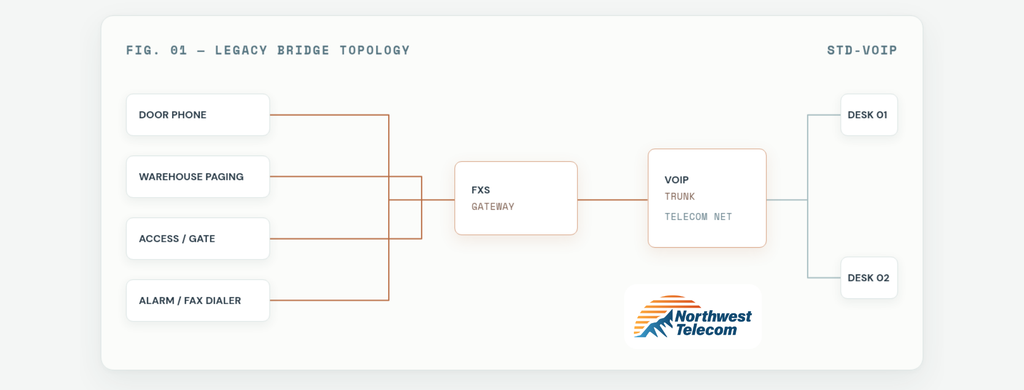
Checklist:
- Door phones & entry intercoms Wired to let a tenant dial out or buzz a visitor in, often the single most business-critical device on the line.
- Warehouse & overhead paging Patched into an old phone line years ago, usually undocumented and rarely on anyone’s diagram.
- Elevator & fire panel dialers Code-required systems, and the ones most often forgotten during a rushed migration.
- Fax lines & card terminals Legacy devices that assume a standard analog dial tone exists on the other end of the jack.
VoIP migration door phone integration:
one gateway, every device stays plugged in.
An FXS gateway converts your new VoIP system’s digital signal back into standard analog dial tone. Legacy hardware plugs into the gateway, not the wall. Same behavior, new backbone.
- SVC / DOOR Door Phone Integration Visitors still buzz in, tenants still pick up, routed through your VoIP platform instead of a metered analog line.
- SVC / ACCESS Access Point Integration Badge readers, gate phones, and intercoms tied into one manageable system instead of scattered legacy wiring.
- SVC / PAGE Warehouse Paging Paging zones dialed like a standard extension, no separate analog line required to reach the floor.
- SVC / LEGACY Legacy Appliance Support Fax machines, alarm dialers, and other analog devices that still need real dial tone to keep functioning.

David Steinkamp
David is a telecommunications business owner with over 35 years in the industry and a reputation as a forward-thinking leader who navigates the rapidly evolving communications landscape with ease. His expertise spans legacy systems and next-generation technology alike, including 5G, cloud computing, IoT, cybersecurity, and cloud-based platforms like VoIP and UCaaS, giving NW Telecom the range to solve problems most providers won’t touch.
Under his leadership, the company has grown by delivering scalable, high-quality service, strategic partnerships, and a customer-first approach across network and cabling infrastructure, business communication systems, cloud solutions, and IT services. David’s focus stays on secure, cost-effective, future-proof solutions that keep clients ahead of the curve, an entrepreneurial drive that’s earned him a reputation for integrity and professionalism across industries.
45+ combined years of legacy migrations taught us the phones aren’t what break.
- Built for legacy + new tech — Big carriers optimize for desk phones at scale. We specialize in the equipment they label “unsupported.”
- Full-line audits, not guesswork — Every device on your old lines gets traced and documented before we touch a cutover date.
- Tested before go-live — We test every appliance and access point tied to the old lines, not just the phones on desks.
- Lower monthly line costs — Consolidating standalone analog circuits onto one VoIP trunk typically cuts recurring line costs significantly.
“VoIP migrations don’t fail because of the phones. They fail because of everything connected to the phones that nobody mapped out first.” — Chris Reyes
FAQ
Will my door phone or intercom still work if I switch to VoIP? Yes, in almost every case. Door phones and entry intercoms are analog devices, so they need an FXS gateway to convert the VoIP signal back into standard dial tone. Once that’s in place, the door phone functions exactly as it did before, you’re just no longer paying for a dedicated analog line to run it.
Can warehouse paging systems run on VoIP? Yes. Overhead and warehouse paging systems can be linked directly into your VoIP phone system, so paging zones are dialed like any other extension instead of requiring a separate analog line.
Why do large VoIP providers struggle with door phones and paging integration? Big-box VoIP providers are built to sell and support desk phones at scale. Legacy hardware like door intercoms, paging horns, and alarm dialers falls outside their standard install, so it often gets labeled “unsupported” and left for the customer to figure out.
What is an FXS gateway, and do I need one? An FXS gateway is a small piece of hardware that bridges legacy analog equipment onto a digital VoIP network. If you have any analog device that isn’t a standard desk phone, a door buzzer, paging horn, elevator phone, alarm dialer, or fax machine, you’ll likely need one to keep it working after the switch.
How do I know what’s connected to my current landline before I switch? A full line audit before cutover is essential. This means physically tracing every line coming into the building and documenting every device attached to it, not just relying on old records or assumptions, since legacy wiring is rarely documented accurately.
Will switching to VoIP save money if I have a lot of legacy equipment? Usually, yes. Consolidating multiple standalone analog lines, one for paging, one for the door, one for the fax, onto a single VoIP trunk with gateway integration typically reduces monthly line costs significantly, even after accounting for the gateway hardware.
Inherited a landline you know needs to change?
Start with a line audit. We’ll tell you exactly what’s connected before anything gets touched.
Contact Us Today For A No Obligation Quote.
Want to understand VoIP? Read
Keen to explore how analog terminal adapters (ATAs) bridge traditional endpoints to cloud architectures, reference the breakdown on WhichVoIP’s ATA (Analog Telephone Adapter) Glossary
.
